Wall Generator
Mode: Advanced.
Variable: wall_generator.
Type: Choice.
Options: classic, arachne.
CLI Example: --wall-generator=classic.
The Wall Generator defines how the outer and inner walls (perimeters) of the model are printed.
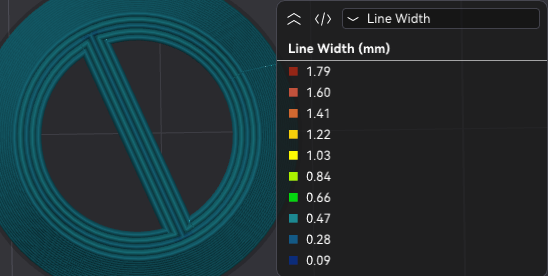
Classic
The Classic wall generator is a simple and reliable method used in many slicers. It creates as many walls as possible (limited by Wall Loops) by extruding along the model’s perimeter using the defined Line Width. This method does not vary extrusion width and is ideal for fast, predictable slicing.
Arachne
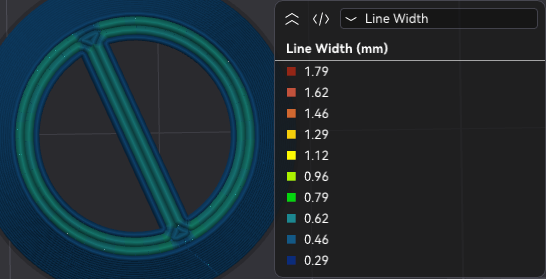
The Arachne wall generator dynamically adjusts extrusion width to follow the shape of the model more closely. This allows better handling of thin features and smooth transitions between wall counts.
Wall transitioning threshold angle
Mode: Advanced.
Variable: wall_transition_angle.
Type: Float.
CLI Example: --wall-transition-angle=1.
Defines the maximum wedge angle (in degrees) at which the algorithm creates a transition between an even and odd number of walls. If a wedge shape exceeds this angle, no extra center wall will be added. Lowering this value reduces the number and length of center walls but may leave gaps or over-extrude.
Wall transitioning filter margin
Mode: Advanced.
Variable: wall_transition_filter_deviation.
Type: Percentage.
CLI Example: --wall-transition-filter-deviation=20%.
Prevents rapid switching between more or fewer walls by defining a tolerance range around the minimum wall width. The extrusion width will stay within the range:
Higher values reduce transitions, travel moves, and extrusion starts/stops, but may increase extrusion variability and introduce print quality issues. Expressed as a percentage of nozzle diameter.
Wall transitioning length
Mode: Advanced.
Variable: wall_transition_length.
Type: Percentage.
CLI Example: --wall-transition-length=20%.
When the number of walls changes as the part becomes thinner, this sets the length allotted to split or join the wall segments. Expressed as a percentage of nozzle diameter.
Wall distribution count
Mode: Advanced.
Variable: wall_distribution_count.
Type: Integer.
CLI Example: --wall-distribution-count=1.
Sets how many walls (counted from the center) the width variation is spread over. Lower values constrain variation to the innermost walls, keeping outer walls consistent for best surface quality.
Minimum wall width
Mode: Advanced.
Variable: min_bead_width.
Type: Percentage.
CLI Example: --min-bead-width=20%.
Defines the width of the wall that replaces thin features (those above the Minimum feature size). If the feature is thicker than this value, the wall will match its width. Expressed as a percentage of nozzle diameter.
First layer minimum wall width
Mode: Advanced.
Variable: initial_layer_min_bead_width.
Type: Percentage.
CLI Example: --initial-layer-min-bead-width=20%.
Specifies the minimum wall width for the first layer. It is recommended to match the nozzle diameter to improve adhesion and ensure stable base walls.
Minimum feature size
Mode: Advanced.
Variable: min_feature_size.
Type: Percentage.
CLI Example: --min-feature-size=20%.
Minimum width required for a model feature to be printed. Features below this value are skipped; features above it but thinner than the Minimum Wall Width are widened to match it. Expressed as a percentage of nozzle diameter.
Minimum wall length
Mode: Advanced.
Variable: min_length_factor.
Type: Float.
CLI Example: --min-length-factor=1.
Avoids very short or isolated wall segments that add unnecessary time.
Increasing this value removes short unconnected walls, improving efficiency.
Note
Top and bottom surfaces are not affected by this setting to avoid visual artifacts. Use the One wall threshold to adjust how aggressively OrcaSlicer considers a region a top surface. That option only appears when this setting exceeds 0.5, or if single-wall top surfaces are enabled.
Maximum wall resolution
Mode: Expert.
Variable: wall_maximum_resolution.
Type: Float.
CLI Example: --wall-maximum-resolution=1.
Controls the smallest wall segment length (in mm) that Arachne keeps during wall path simplification.
Lower values preserve more small segments and curved detail, which can improve surface quality, but increase G-code size and motion complexity.
Higher values simplify paths more aggressively, producing cleaner and smaller G-code at the cost of geometric fidelity.
Maximum wall deviation
Mode: Expert.
Variable: wall_maximum_deviation.
Type: Float.
CLI Example: --wall-maximum-deviation=1.
Defines the maximum allowed geometric error (in mm) when simplifying wall paths.
Increasing this value allows stronger simplification (smaller G-code and fewer tiny moves), but can reduce wall accuracy.
Decreasing this value keeps walls closer to the original geometry, but retains more segments.
If this setting conflicts with Maximum wall resolution, this deviation limit takes precedence.