V2.4.0 Beta
This is the OrcaSlicer V2.4.0 Beta. A lot of effort has gone into this release to improve stability, speed, and print quality, along with the interface and printer support. Bridging in particular has been greatly improved by @ianalexis, @kisslorand, and many others, and a new realistic rendering option from @RF47 makes your models look gorgeous right inside OrcaSlicer.
There's good news for multi-material users too: per-feature filament assignment got a big upgrade, opening up much more creative prints. Ever thought about printing the outer walls in TPU and the rest in PLA? Now you can — check out the details below.
Note: Everything from the 2.4.0 Alpha — Orca Cloud, Z Anti-Aliasing (ZAA) contouring, Machine Input Shaping, Optimized Gyroid infill, and the redesigned printer selection dialog — is included in this build. See the 2.4.0 Alpha release notes for details on those.
🌊 New Features & Improvements
-
Realistic View: Phong shading, ambient occlusion, and cast shadows by @RF47 in 13704 Adds a new set of rendering options to the 3D canvas, letting you switch between the classic Gouraud shader and a new Phong shader and layer on SSAO ambient occlusion and cast shadows. The result is a far more realistic, depth-rich preview of your models. Reflections (Phong) and cast shadows are available in prepare mode.
Gouraud Gouraud + SSAO Gouraud + SSAO + Shadows Phong Phong + SSAO Phong + SSAO + Cast Shadows -
Configurable lightning infill angles by @RF47 in 13848, with wiki documentation by @ianalexis in 13984 Exposes three new expert-mode settings for lightning infill: the overhang angle (how far walls can support the layer above), the prune angle (how aggressively short unsupported branches are removed), and the straightening angle (how far branches can be simplified). These give finer control over how lightning infill is generated. Fixes #13758.
Overhang Prune Straightening -
Double-click an object list row to frame it in the 3D view by @RJAudas in 13804 Adds Blender-style "Frame Selected" behavior to the object list: double-clicking an object, part, or instance row in the left panel now frames that item in the 3D view while preserving the current view angle. It is the same camera move as the existing "Fit camera to scene or selected object" toolbar button, just exposed through a more natural trigger. The action is inert in slice-preview mode. Resolves #13800.
Before:
https://github.com/user-attachments/assets/02b4e58e-2f49-4ffa-aa10-125e6bd2d91c
After:
https://github.com/user-attachments/assets/a4a4c96d-356b-4797-8cff-7fd96ba61753
-
Preview sliders overhaul by @kisslorand in 13919 A comprehensive refresh of the layer preview sliders. The layer labels next to the vertical slider are now fully interactive — you can click and drag them directly for a much larger interaction target, they highlight on hover, and clicking preserves the current position instead of jumping. Both vertical and horizontal sliders received a cleaner visual style with clearer borders, subtle shadows, and consistent accent styling, and single-layer preview now matches multi-layer preview for smoother transitions.
https://github.com/user-attachments/assets/2e5931a0-ec05-4a13-bef2-1602b20934f7
-
Troubleshoot Center by @yw4z in 12416 Adds a new Troubleshoot Center, accessible from the Help menu, that gathers everything needed to diagnose problems in one place. It can save logs as a zip, set the log level, and copy auto-formatted system information (OS, CPU, RAM, GPU, monitors with resolution and scaling) ready to paste into a GitHub report. It also includes a profiles overview with enabled/total/user stats and a "Rebuild" button that safely clears the cached profiles folder and relaunches Orca. No user-specific information is collected, and system specs can be hidden before taking a screenshot.
-
Hide unsupported presets in the preset dropdown by @Noisyfox in 13959 Unsupported presets are no longer shown in the preset combo boxes by default, keeping the dropdown lists focused on presets that actually apply to your setup. This also makes switching printers noticeably faster, especially if you have a large number of filament profiles. A developer setting can show unsupported presets again if needed.
-
Disable "Slow down for curled perimeters" by default and clarify its tooltip by @igiannakas and @ianalexis in 13870 and 13918 This setting (ported from PrusaSlicer to help printers with weak part cooling avoid upward curling at sharp overhangs) is now off by default, because at today's faster print speeds it can cause wall-consistency artifacts unless pressure advance is carefully tuned. The tooltip was expanded with tuning recommendations so users who still want it know what to adjust. Printer profiles that explicitly enable it are unaffected.
-
New
--logfileoption to write diagnostics to a file by @gloth-3ds in 13931 A new--logfile <filename>command-line option lets OrcaSlicer write log messages to a file. This is especially useful on Windows, where the windowed build provides no console, making it much easier to capture diagnostics for troubleshooting. -
Add multiline fill to the infill type dropdown by @RF47 in 13852 Adds the multiline fill pattern to the infill type selector in the UI, which was previously missing from the list. You can now select it directly without editing the configuration manually.
-
Allow wipe with firmware retraction by @vovodroid in 13812 Wipe can be combined with firmware retraction only when retract-before-wipe is 100%. Orca now forces that value to 100% when firmware retraction is enabled, so wipe behaves correctly.
-
Unify the Setup Guide and standalone Printer/Filament selection dialogs by @yw4z in 13579 Merges the duplicated code behind the Setup Guide and standalone versions of the Printer and Filament selection dialogs (removing roughly 2,200 lines of duplicate code) to make future development easier. Along the way it fixes the ESC key on the standalone dialog — the first ESC now closes the sidebar instead of the whole dialog — and resolves a few minor selection bugs.
-
OrcaSliced Handy Model by @ianalexis in 13727, with a menu fix by @SoftFever in 14102 Adds a multi-color sample model — a stylized Orca on a pedestal alongside an Orca Cube — that showcases multi-color printing, auto-arrange, and loading multiple input files. Orca model by @RF47 (based on the logo by @jal-co), Orca Cube by @SoftFever, Orca text by @yw4z, and pedestal by @ianalexis.
Bridging
A major bridging overhaul — a dedicated bridge line width, smarter bridge-angle controls, and a batch of reliability fixes for external, counterbore, and per-modifier bridges.
-
Dedicated bridge line width for stronger, better-bonded bridges by @ianalexis, @RF47, @Noisyfox, and @valerii-bokhan in 11255 Bridges previously reused the internal solid infill line width, which is usually wider than the nozzle and wrong for lines printed in mid-air with nothing to press against. This adds a separate bridge line width (capped at 100% of nozzle size) so each bridge line welds cleanly to its neighbor, improving bridge surface quality without increasing print time. Fixes #11209, #11412, #13106, and #10516.
-
Relative bridge direction and align bridge/ironing angles to the model by @ianalexis in 12055 Adds a relative bridge direction mode so you can nudge the bridge angle by a few degrees to better cover a region instead of being locked to a single absolute angle. It also makes absolute bridge angles and ironing angles respect the "Align infill direction to model" option, so both now rotate with the part as expected. Fixes #12076.
Bridge angle aligned to model: before After Ironing angle aligned to model: before After -
More reliable external bridges on complex geometry by @ianalexis and @RF47 in 12568 Improves bridge region detection so external bridges form correctly on complex shapes, particularly where contours share vertices and micro-gaps between adjacent surfaces previously broke bridging. The result is more consistent, fully-formed external bridge surfaces. Fixes #11558.
Before After -
Fix stray bridge infill on top surfaces with "Extra bridge layers" by @igiannakas in 13860 Fixes a bug where enabling Extra bridge layers could scatter bridge infill across the printed top surface of solid models, an issue that mainly showed up on Intel/Windows hosts. It also resolves several threading data races in the bridge and lightning-infill passes, making slicing more stable and producing deterministic, repeatable G-code for the same model and settings across platforms.
External bridge: before After Internal bridge: before After -
Fix counterbore hole bridging by @kisslorand in 13956 Fixes two problems with bridges over counterbore holes: sacrificial bridges were being applied to holes that did not need them, and partial bridges could start or stop in mid-air, leaving gaps between the bridge and the wall. Now sacrificial bridges only go where required and partial bridges are properly anchored with clean gaps around the hole.
Sacrificial layer: before After -
Respect per-modifier bridge speed by @kisslorand in 13971 Fixes internal and external bridge speeds set on modifier volumes not always being applied during slicing. It also corrects a sorting bug so overlapping model parts and modifiers are ordered more predictably. Fixes #13952.
External bridges: before After
Multi-Material
-
Add a "Default" filament option for per-feature filament settings by @ianalexis in 13887 Introduces a new "Default" choice (filament index 0) for the wall, sparse infill, and solid infill filament options, which uses the active object's or part's filament instead of forcing a fixed filament number. Projects and profiles imported from versions older than 2.4.0 are automatically migrated so these options switch from 1 to 0. This makes per-object filament assignments more intuitive and consistent with support filament behavior. Fixes #13850.
-
Expand "filament for features" (per-feature filament assignment) by @ianalexis in 13937, 14042, and 14033 Expands the per-feature filament capability — which lets you assign different filaments to individual object features such as inner/outer walls, top/bottom surfaces, and sparse/solid infill. It now works on single-extruder multi-material (SEMM) printers, offers more granular per-feature controls, and ships with updated profile versions.
Connectivity & Printer Hosts
-
Native Moonraker (Klipper) print host support by @packerlschupfer in 13991 Adds a new "Moonraker (Klipper)" host type that speaks Moonraker's native REST API directly, rather than relying on the OctoPrint-emulation plugin. This means cleaner uploads and print starts for native Moonraker setups and Moonraker-compatible firmwares like the Prusa Buddy Klipper fork, including optional API-key auth and a storage-root picker. The existing "Octo/Klipper" entry is left untouched, so current setups keep working.
-
3DPrinterOS cloud host integration by @3DPrinterOS-SDK in 10403 Adds 3DPrinterOS as a new cloud host type, letting you send sliced jobs straight to your 3DPrinterOS account from OrcaSlicer. The integration handles login/logout, job upload with printer-type and project confirmation, and embeds the 3DPrinterOS web interface directly in the device tab — bringing managed, cloud-based print queuing to users on the platform without leaving the slicer.
-
Flashforge Adventurer 5 series local send with IFS slot mapping by @marianomd in 12991 Adds a LAN-based send workflow for the Flashforge Adventurer 5 series, including local printer discovery, saving the printer serial number and access code, and a Flashforge-specific send dialog. On the AD5X, you can map your project's materials to the IFS slots currently loaded in the printer before sending. Uploads use 3MF packaging to match the expected AD5X workflow, so prints correctly show remaining time on the printer display. This is local/LAN only and does not add cloud support.
-
Elegoo GIGA multi-printhead configuration by @anjis-elegoo in 13901 Adds a "Number of GIGA printheads" option for the Elegoo GIGA, which runs multiple printheads in parallel on the same job. Selecting more printheads automatically shrinks the usable print area accordingly (full plate for one head, half for two, a quarter for more than two), and the exported G-code is tagged with the configured printhead count so the printer knows how the file was prepared. The option only appears when a GIGA printer is selected.
Creality K-series
Comprehensive support for Creality's K-series printers, combining new connectivity features with a full profile refresh.
-
LAN discovery, CFS filament sync, and K-series filament profiles by @grant0013, @imammedo, @hamham999, @alysandreollo, and @SoftFever in 13752 Adds end-to-end support for Creality K-series printers (K2 / K2 Plus / K2 Pro) when using the CrealityPrint host type. The Browse button now auto-discovers K-series printers on your local network, the sidebar can sync the filament slots loaded in the CFS into matching Orca presets, and around 110 K-series filament profiles are bundled (CR-PLA, CR-PETG, Hyper PLA, and more across all nozzle sizes). This builds on the CrealityPrint host-type foundation by @imammedo. Thanks to @swilsonnc, @DaviBe92, @Requiem-MH, @TrainAss, and @JoveYu for the work and testing that made it possible.
Network discovery CFS filament sync 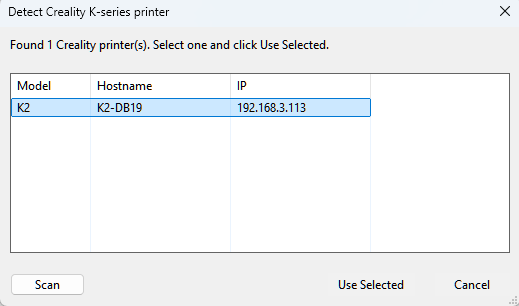
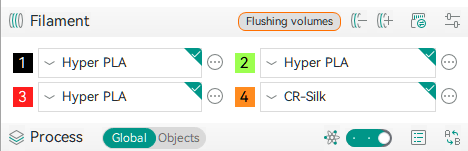
-
Refreshed Creality profiles and new printer support by @hamham999 and @alysandreollo in 13947 Ports the latest Creality machine, process, and filament profiles from CrealityPrint v7.1.0, replacing outdated profiles that caused poor print quality and incorrect multicolor time estimates. Adds previously-missing printers — Creality SparkX i7, K2 SE, the K1 and K1 2025 CFS-C variants, Ender 3 V4, and Ender 5 Max — and includes OrcaSlicer compatibility fixes such as replacing the thumbnail schema that crashed Orca, enforcing the Arachne wall generator, and fixing multicolor printing for CFS/CFS-C printers.
-
Creality profile fixes and cleanup by @hamham999 in 14073 and 14085 Follow-ups to the profile refresh: fixes the K2 Plus start G-code that used an unsupported
if multicolorconstruct and caused slicing errors, removes leftover duplicate/outdated process files, and renames Creality processes to the standard scheme (SuperDetail, Fine, Optimal, Standard, Draft) so they are differentiated by layer height.
Orca Cloud & Privacy
-
Guided resolution for cloud sync conflicts by @peachismomo in 13900 Previously a sync conflict surfaced only as a confusing raw error. Orca now explains the conflict and offers two clear choices: pull the latest version from the cloud, or force push your local changes. This makes it much easier to recover when local and cloud presets diverge.
Pull from cloud Force push -
Stealth Mode improvements and a new "Hide login side panel" option by @SoftFever in 13963 Clicking Login while in Stealth Mode now shows a dialog offering to quit Stealth Mode and proceed, instead of doing nothing silently, and the cloud login window centers on the main window rather than the primary display on multi-monitor setups. A new Preferences → Online option, "Hide login side panel," declutters the home page without enabling full Stealth Mode, and the Stealth Mode description now clarifies that it disables all cloud features including Orca Cloud profile syncing. The Health Management System (HMS) is also disabled when the Bambu Network plugin is not installed, avoiding needless network requests in offline/LAN-only setups.
-
Disable Bambu cloud telemetry before the network plugin starts by @SoftFever in 13898 For improved privacy, Bambu cloud telemetry is now disabled before the Bambu Network plugin's startup runs, ensuring it cannot send telemetry during initialization.
🛠️ Bug Fixes
Slicing, Supports & G-code
-
Fix Arachne duplicate extrusion on thin walls by @akshimassar in 14031 Fixes a bug where the Arachne wall generator produced duplicate, overlapping extrusion paths on thin outer walls at certain minimum bead width settings. Thin walls now produce a single clean perimeter loop instead of two coinciding loops, improving print quality and avoiding over-extrusion. Fixes #13917.
-
Fix tree support top interfaces printing in thin air and unsupported edges by @kisslorand in 14040 Resolves several tree-support interface problems: non-organic tree supports could print top interfaces floating in mid-air or over unsupported areas, organic tree supports could fail to generate a top interface at all, and non-organic tree supports left the edges of overhang areas only barely supported. Tree supports now reliably generate proper interfaces and fully fill overhang edges, producing more dependable supports and better surface quality.
Before After -
Fix organic tree support drift and floating branches with rafts by @kisslorand in 14069 and 14092 Fixes two issues with organic tree supports where branch paths could drift excessively during collision avoidance and smoothing, and where supports could appear floating or unsupported around the raft and early support layers when a raft was enabled. As a welcome side effect, generated supports are now noticeably smoother. A follow-up further refines this: the node-smoothing clamp is now relative, so it no longer pulls already-valid branches inward and collapses upper geometry, and layer-0 build-plate roots get a flat vertical foot to avoid malformed first-layer contours. Fixes #14036.
Before After -
Fix organic tree support bottom interface layer count by @kisslorand in 14095 Organic tree supports were not honoring the "Same as top" setting for the number of bottom interface layers. All support types now route through a shared helper so the bottom-interface fallback is applied consistently.
Before After -
Fix crash when slicing with non-organic tree supports by @kisslorand in 14074 Fixes cases where OrcaSlicer could crash during slicing when non-organic tree supports were used. Slicing now completes reliably with this support type instead of aborting.
-
Fix division-by-zero crash in organic tree support generation by @kisslorand in 13936 Fixes an edge case where organic tree support generation could fail when certain support clearances were set to zero, which could cause division-by-zero and other invalid calculations. A small minimum value is now enforced only in this situation, and an internal safety flag is reset before each object so it no longer incorrectly carries over to other objects, re-slices, or other plates in a multi-plate project.
-
Fix overhang preview ignoring support threshold fallbacks at 0° angle by @kisslorand in 12650 When the support overhang threshold angle is set to 0, OrcaSlicer applies fallback rules during slicing (30° for tree supports, or a value derived from the overlap setting for normal supports), but the preview overhang highlighting previously used the raw 0° value. The preview now applies the same fallback logic, so highlighted overhangs correctly reflect where supports will actually be placed. Fixes #12634.
Before (Tree) After (Tree) -
Fix inconsistent ordering of support base outline and fill by @kisslorand in 11761 Support bases are now generated deterministically, printing each base's outline first and immediately following it with its fill, instead of the order sometimes varying. Geometry, extrusion parameters, and visual output are unchanged. Fixes #10711.
-
Fix
total_toolchangesplaceholder reporting 0 without a wipe tower by @mrmees in 13895 Thetotal_toolchangesplaceholder previously always returned 0 for prints without a wipe tower (such as manual M600 swaps or toolchanger/IDEX setups with the wipe tower disabled), breaking custom G-code and output filenames that relied on it. It now falls back to counting tool changes from the print's tool ordering, while leaving wipe-tower prints byte-for-byte unchanged. -
Fix built-in placeholders missing from custom G-code and output filenames by @mrmees in 13892 Fixes several documented placeholders that threw a "Variable does not exist" error in certain contexts. This restores
versionin custom G-code, the timestamp/date/time fields anduserin the file-header G-code, andinitial_extruder,extruded_weight_total, andextruded_volume_totalin output filename formats. Fixes #12436 and #10708. -
Fix air filtration G-code emitted on printers that don't support it by @kisslorand in 13868 Orca no longer emits air filtration G-code when the printer profile does not support air filtration. Exhaust fan commands also now produce descriptive G-code comments when Verbose G-code is enabled. Fixes #13646.
-
Enhance G92 E0 case-sensitivity check by @Wegerich in 13933 The G92 E0 check is now case sensitive and shows an error when incorrect casing (such as
G92 e0) is used, catching a common custom G-code mistake. -
Fix junction deviation and jerk settings behavior by @kisslorand in 14004 On Marlin printers, junction deviation and jerk are mutually exclusive, but Orca could warn about a junction deviation mismatch even when junction deviation was disabled. The junction deviation control now appears only when the printer has it enabled (with jerk controls hidden), jerk settings are restored when it is disabled, and the mismatch warning is scoped to the active junction-deviation path. Fixes #14000.
Before After
Interface & Usability
-
Fix color swatch not updating when a different filament is selected by @igiannakas in 14038 Fixes the filament color swatch (the numbered button beside each sidebar filament dropdown) failing to update when you selected a different-colored filament preset. It now resolves the correct preset and refreshes the swatch reliably, including in the single-filament case.
Before:
https://github.com/user-attachments/assets/1012c31a-9fd6-443f-a33f-8748dd5c9b27
After:
https://github.com/user-attachments/assets/754093e6-278b-478f-a663-3e8bb2950e3a
-
Fix row spacing in the objects list by @igiannakas in 14053 Restores the correct, compact objects-list row spacing that was broken after the wxWidgets update. Other widgets were unaffected.
-
Preserve Z scale when Ctrl-dragging an XY corner by @Calcousin55 in 13840 When scaling with Ctrl+drag on a corner grabber, the scale was incorrectly applied to all three axes including Z. Now Ctrl+dragging a corner scales only X and Y while preserving the Z dimension and applying the correct offset, so just the corner moves. Normal (non-Ctrl) corner drag still scales uniformly.
Before:
https://github.com/user-attachments/assets/9bca6e5a-d097-4a47-97f2-76a70c083e0f
After:
https://github.com/user-attachments/assets/94caacf3-67d6-4f1c-a122-3ec04b5301f8
-
Cut: account for X offset when checking multi-dovetail connectors by @Noisyfox in 13945 Fixes the Cut tool so the X offset is properly considered when validating multiple dovetail connectors, preventing incorrect dovetail placement or validation when cutting objects. Fixes #13940.
-
Fix minor issues in the STEP import dialog by @spr0u in 14067 Fixes the initial mesh face count occasionally cancelling before completion, and prevents the "Calculating, please wait…" text from being cut off.
-
Fix stuck hover state after opening the printer preset dialog by @spr0u in 14082 Fixes the printer preset border highlight and edit button appearing stuck after opening the preset edit dialog on macOS.
-
Fix Print/Export dropdown closing before the cursor reaches the menu on macOS by @JustNotesa in 13995 On macOS (since the wxWidgets 3.3 upgrade), the Print/Export split-button dropdown closed the instant the cursor entered the gap between the button and the menu, making "Export" impossible to select. The menu is now anchored flush against the button to remove the dead zone. Fixes #12936.
-
Fix filament group popup dismissed too quickly on macOS by @Noisyfox in 13837 Fixes a macOS issue where the filament group popup would close before you could interact with it.
-
Fix incorrect grouping of custom printer profiles by @igiannakas in 14044 Fixes custom printer profiles being lumped into an "unspecified" group because the printer preset list was incorrectly affected by the filament grouping selection. Custom printer profiles are now grouped correctly, restoring the 2.3.2 behavior.
Before After -
Fix printer variant validation and errors in profiles by @SoftFever in 14084 Adds a printer variant check to variant profiles and corrects printer variant errors present in existing profiles, improving the reliability of variant-based printer configurations.
-
Allow unchecking URL association in Preferences by @SoftFever in 13899 URL association options in Preferences can now be unchecked. Fixes #13884.
Stability & Crashes
-
Fix crash when deleting filaments after switching profiles by @igiannakas in 14055 Fixes a crash that could occur when removing a filament after loading a project or switching to a printer profile with a different number of filaments, caused by the per-plate filament data going out of sync with the global filament count.
-
Fix crash with custom multi-extruder profiles based on a single-extruder printer by @Noisyfox in 13896 Fixes a crash that could happen when you have a custom multi-extruder printer profile derived from a single-extruder (SEMM) base printer. The nozzle volume type list is now always sized correctly for the extruder count.
-
Fix crash when switching to a printer with fewer filaments by @SoftFever in 14103 Switching to a printer with fewer filaments (for example from the H2D to the X2D) could throw an out-of-range error during filament-printable checks. Orca now clears stale per-volume extruder settings when the filament count shrinks and bounds-checks filament indices, so the switch completes without crashing.
https://github.com/user-attachments/assets/7191892b-df89-4cd4-92d7-7061809e171c
-
Fix crash loading a user preset with inconsistent per-variant settings by @SoftFever in 14106 Fixes a crash when loading a user preset whose per-variant settings had mismatched sizes; such presets now load reliably. Fixes #13543.
Connectivity & Cloud
-
Fix mDNS discovery on Windows PCs with multiple network adapters by @AnyOldName3 in 13993 Resolves a regression where network printer discovery (mDNS) failed to find devices on Windows machines with multiple network adapters, often returning unusable IPv6-only addresses or broadcasting into the wrong adapter. Fixes #13969.
-
Fix CC2 device connection on Linux by @anjis-elegoo in 14024 Fixes connection problems with the Elegoo Centauri Carbon 2 device panel on Linux by re-registering the webview script message handler, which could otherwise be dropped. The bundled WebUI is also updated to the latest version.
-
Fix CC2 device panel showing Offline by passing the printer serial by @DeathKhan in 13878 Fixes the Elegoo Centauri Carbon 2 device tab incorrectly showing Offline even after a successful connection test. Orca now resolves and passes the printer serial number (caching it across restarts) so the device panel subscribes to the correct MQTT topics, which also removes an artificial ~10-second delay when opening the Device tab.
-
Fix web-page communication with native code on Windows by @anjis-elegoo in 13829 Fixes a Windows issue where embedded web pages (such as printer device panels) lost the ability to communicate with native code after their scripts were reset, breaking interactive elements.
-
Preserve 3MF project settings when a cloud sync finishes by @peachismomo in 13834 When a 3MF project was open and a cloud preset sync completed, the sync could overwrite the project's settings. Orca now restores any settings the sync touched, keeping your 3MF project intact.
-
Fix garbled non-ASCII Orca Cloud usernames by @Noisyfox in 13856 Orca Cloud usernames containing non-ASCII characters (such as accented letters or CJK text) were displayed incorrectly in the UI, and now render properly. Fixes #13847.
-
Retry preset migration when login warmup blocks the cloud check by @ExPikaPaka in 14049 Right after signing in, a brief window where the cloud session hasn't fully propagated could cause a 401 and silently skip migrating your existing local presets to Orca Cloud — making first-time users think their presets were lost. Orca now schedules a single deferred retry so the migration succeeds once the session is ready.
-
Don't log out of Orca Cloud on transient token-refresh failures by @SoftFever in 14110 A temporary network glitch during an Orca Cloud token refresh could log you out unexpectedly. Transient refresh failures are now tolerated, so brief connectivity hiccups no longer end your cloud session.
Calibration
-
Stop VFA calibration from disabling input shaping (Marlin 2) by @Argolein in 14079 VFA calibration was incorrectly forcing input shaping off in the generated G-code, instead of only disabling resonance avoidance as intended. On printers like the Prusa Core One this caused layer shifts and hiccups. VFA calibration now leaves all input shaping settings untouched.
Before After -
Fix false nozzle diameter mismatch error in manual calibration by @SoftFever in 13882 Fixes Flow Rate and Flow Dynamics calibration failing on P1-series printers with a "nozzle diameter does not match" error even when the diameters matched and the UI showed nozzle info as synced. Manual calibration now starts correctly on these printers. Fixes #13798.
-
Fix nozzle diameter guards for printers that don't report nozzle info by @cgarwood82 in 13255 Follow-up to #13330 for printers whose firmware doesn't report a nozzle diameter (Klipper/Moonraker, RepRapFirmware, Marlin). It stops spurious printer-mismatch prompts on every file load, lets the multi-extruder sidebar list sync when re-selecting a preset, and falls back to the selected preset's nozzle diameter so AMS and Calibration History filament lists populate correctly for older-firmware BBL printers with non-0.4 nozzles.
🐧 Linux
Linux-specific features and fixes — including several native Wayland improvements — gathered in one place.
-
Opt-in X11 backend to restore Device tab hardware acceleration by @igiannakas in 14039 Wayland remains the default, but Linux users who hit native-Wayland bugs can now opt into the v2.3.2-style X11/XWayland path by setting
GDK_BACKEND=x11in their launcher'sExec=line or environment. On this path WebKit compositing stays enabled, restoring hardware acceleration on the Device tab, Setup Wizard, and login pages, and fixing the 3D canvas covering the top/left toolbars on startup. Multi-monitor KDE Plasma users should stay on the Wayland default, where borderless XWayland can cause unregistered clicks. -
Fix CPU spin in the Sidebar leave handler on inactive Wayland workspaces by @d4not in 13897 Fixes a freeze where OrcaSlicer would peg a CPU core indefinitely after switching to another workspace on Wayland compositors (such as Hyprland, KDE Plasma, and Cinnamon) that keep windows mapped on inactive workspaces. Refs #11196, #12387, and #13067.
-
Fix freeze caused by the dynamically hidden printer edit button by @spr0u in 14010 A follow-up to the Wayland freeze fix above: resolves a remaining UI freeze (seen primarily on Linux) that could occur when hovering the printer-preset edit button after scrolling down a settings tab. Refs #12387.
-
Fix non-functional OBJ import dialog on Linux by @yw4z in 13914 Repairs the OBJ import (object color) dialog on Linux, where color buttons did not display their colors and the "view" combobox was unclickable. Fixes the spin-control sizing and several layout issues, including the view combobox overlapping the preview image.
Before After -
Fix random startup crash on Linux by @SoftFever in 14052 Resolves a sporadic crash while OrcaSlicer was launching on Linux. The splash screen could be dismissed by mouse or keyboard input and then accessed after it had already been destroyed; startup is now reliable even if you click or type while the splash screen is showing.
-
Fix crash from a temporary string going out of scope on Linux by @peachismomo in 13925 Fixes an intermittent crash on Linux caused by a temporary text string being freed before it was used to set a label. Fixes #13831.
🖨️ Printer & Filament Profiles
- Anycubic Kobra S1 Max profiles by @ArtytheSecond2nd in 14017
- SeeMeCNC printer profiles by @SoftFever in 13924, with tuned print speeds by @Sewbot in 14075, plus multicolor, support, and retraction fixes by @Sewbot in 14096
- DREMC filament profiles (PLA, ABS, ASA) by @dremc in 13783
- More Polymaker filament presets by @Jingxi-Polymaker in 13858
- FilAr filament vendor (PLA, PLA-mate, PETG) by @gyarros in 13977
- LH Stinger profile update by @lhndo in 13865
- re:3D profile updates and cover-image naming fixes by @re3Dev in 13750 and 13907
- Elegoo profile sync by @wujie-elegoo in 13790, and Elegoo process profile fixes by @thelegendtubaguy in 14020
- Bambu Lab X2D 0.4 nozzle profile and machine start G-code updates by @Bingo2023 in 13944 and 13985, with air filtration enabled by @diego-cr in 14090
- Snapmaker U1 0.4 nozzle profile update by @KuzuriAo in 14066
- Fix Snapmaker U1 collisions during print-by-object and material changes by @KuzuriAo in 13854, and @RF47 and @ianalexis in 14097
Updates the Snapmaker U1 0.4 nozzle change-filament and machine-end G-code to track the height of all objects on the plate and lower the build plate to clear the tallest one, preventing the print head from colliding with previously printed objects during "Print by Object". A follow-up corrects a bad
G90in the change-filament G-code and restores the measured head-clearance values, fixing collisions during material changes. - Fix Anycubic Kobra 3 Max bed exclusion zones by @thelegendtubaguy in 13879 Corrects the bed size and exclusion zones so exclusion zones are now visible and auto-arrange works properly.
- Remove hardcoded Qidi Max 4 input shaper by @thelegendtubaguy in 13864 The Qidi Max 4 now uses the input shaper values determined during its own machine calibration instead of a hardcoded algorithm.
- Remove redundant toolchange retraction/un-retraction in the CC1 profile during filament change by @MatiasFernandez in 13456
- Fix printer variant for Voron 0.4 profiles by @igiannakas in 14041
🗪 Localization
- Thai (th) localization — complete translation, enabled in the GUI, with font and contextual fixes by @Icezaza2543 in 13916, 14006, and 14056
- French (fr) translation completed to 100% (plus 3DPrinterOS dialog extraction) by @foXaCe in 14037
- German (de) missing translations filled in by @hliebscher in 13819
- Brazilian Portuguese (pt-BR) translation improvements by @afmenez in 13823 and 13973
- Hungarian (hu) language update by @kisslorand in 13825 and 13841
🧰 Misc
- Improve incremental compile speed on Windows by @yw4z in 12881
Windows build tuning (compiler memory pressure, linker
/LTCG, and batched encoding checks) that cuts incremental compile times by roughly 20–30 seconds — a quality-of-life improvement for contributors building from source. - Publish build artifacts to a draft release via a maintainer-gated CI workflow by @SoftFever in 14099 Adds a maintainer-gated GitHub Actions workflow that uploads build artifacts to a draft release, streamlining the release process.
❤️ Support OrcaSlicer
OrcaSlicer is — and will remain — free and open source.
Every release represents countless hours of behind-the-scenes work: building features, fixing bugs, validating profiles, and testing across real machines.
If OrcaSlicer helps you bring ideas to life, please consider supporting the project. Donations are used to support the open-source contributors who help build and maintain OrcaSlicer, and to cover project costs such as servers, development tools, test machines, filament, printer parts, and other infrastructure.
Your support helps us keep improving OrcaSlicer for everyone — while keeping the project free, open, and community-driven.
Thank you for being part of the OrcaSlicer journey. 🙏

