Overhang Speed
Slow down for overhang
Mode: Advanced.
Variable: enable_overhang_speed.
Type: Boolean list.
CLI Example: --enable-overhang-speed=1.
Enable this option to slow printing down for different overhang degree.
This can help improve print quality and reduce issues like stringing or sagging.
Slow down for curled perimeters
Mode: Advanced.
Variable: slowdown_for_curled_perimeters.
Type: Boolean list.
CLI Example: --slowdown-for-curled-perimeters=1.
Enable this option to slow down printing in areas where perimeters may have curled upwards.
For example, additional slowdown will be applied when printing overhangs on sharp corners like the front of the Benchy hull, reducing curling which compounds over multiple layers.
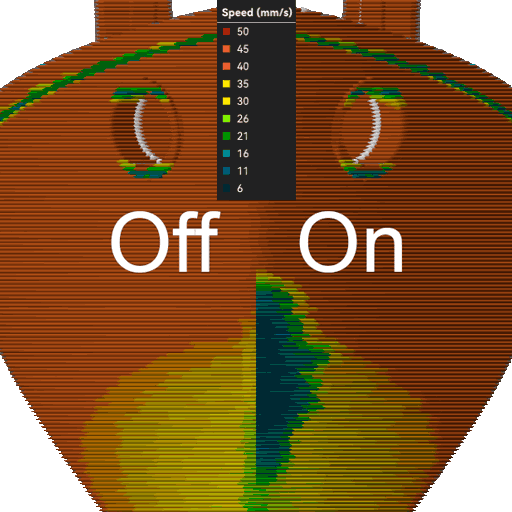
It is generally recommended to have this option switched on unless your printer cooling is powerful enough or the print speed is slow enough that perimeter curling does not happen.
If printing with a high external perimeter speed, this parameter may introduce wall artifacts when slowing down, due to the potentially large variance in print speeds causing the extruder to be unable to keep up with the requested flow change.
Root cause of these artifacts is most likely PA tuning being slightly off, especially when combined with a high PA smooth time.
Tip
When enabling this option:
- For Klipper machines: Reduce Pressure Advance smooth time to 0.015 - 0.02 so the extruder reacts quickly to the speed changes.
- Increase the minimum print speeds to limit the magnitude of the slowdown and reduce the variance between fast and slow segments.
- If artifacts still appear, enable Extrusion rate smoothing to further smooth the flow transitions.
Note
When this option is enabled, overhang perimeters are treated like overhangs, meaning the overhang speed is applied even if the overhanging perimeter is part of a bridge.
For example, when the perimeters are 100% overhanging, with no wall supporting them from underneath, the 100% overhang speed will be applied.
Speed
Mode: Advanced.
Variables: overhang_1_4_speed, overhang_2_4_speed, overhang_3_4_speed, overhang_4_4_speed.
Type: Float or Percentage list.
CLI Example: --overhang-1-4-speed=20% (same pattern for the other variables above).
This is the speed for various overhang degrees. Overhang degrees are expressed as a percentage of line width.
Note
0 speed means no slowing down for the overhang degree range and wall speed is used.
Bridge speed
Set speed for external and internal bridges.
It's usually recommended to increase internal bridge speed to reduce print time, while external bridge speed should be reduced to improve print quality.